A blank pipeline isn’t flexibility. It’s homework.
Most job management software gives you an empty pipeline and tells you to configure it yourself. The idea is flexibility. The reality is that most tradespeople never set it up properly — because they didn’t become a contractor to spend time configuring software.
The other problem is that a generic pipeline doesn’t know that a plumber needs a pressure test stage, or that an electrician needs a permit stage before installation begins, or that a painter’s quote process starts with a colour confirmation.
These are not customisations. They are the actual workflow. Duuabl builds them in from the start.
Empty stages. No trade context. No compliance fields. Configure it yourself or use it half-built.
Select your trade. Your pipeline, checklists, compliance fields, and quote templates load automatically.
Select your trade at signup. Your workflow loads.
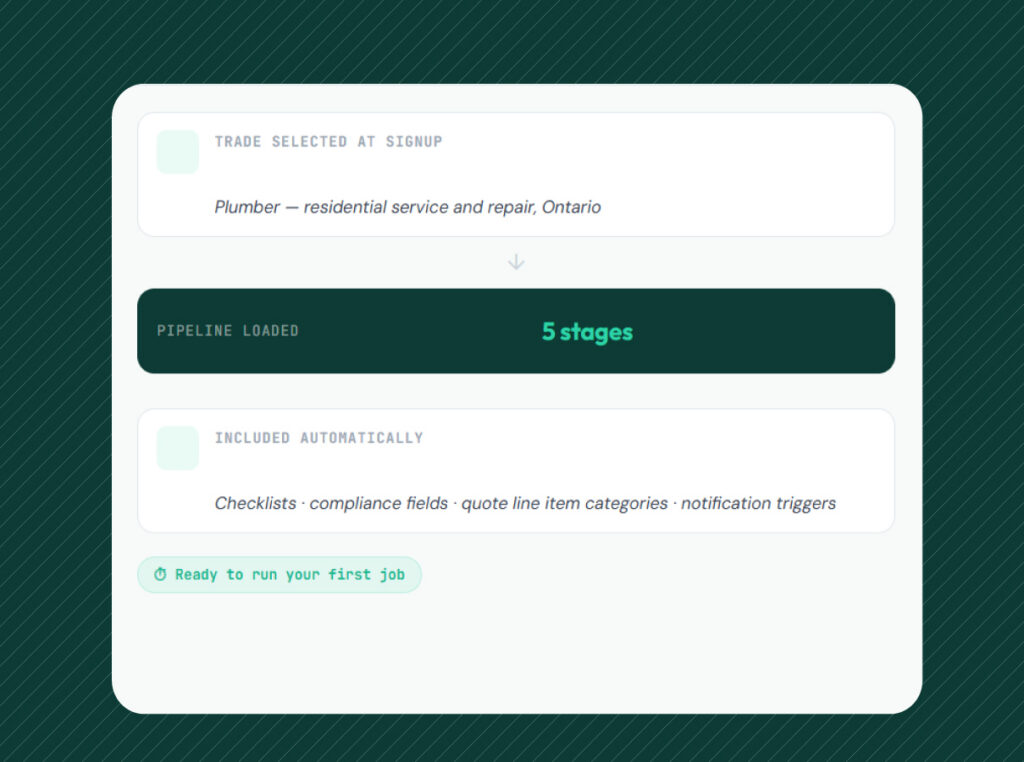
At signup, you select your trade. Duuabl loads the correct pipeline automatically — stages, checklists, compliance fields, and quote line item categories. Nothing to configure. Nothing to set up. The system knows how your jobs work before you run the first one.
The pre-configured workflow is the starting point, not a constraint. You can rename stages, reorder the pipeline, add steps, and create custom fields. The structure is there so you don’t start from zero. What you build on top of it is yours.
- Trade selected once at signup — workflow loads automatically, no setup required
- Stage checklists built in — tasks for each step pre-populated for your trade
- Compliance fields included — permit references, licence numbers, certificate records
- Quote line item categories pre-loaded — standard labour and material types for your trade
- Fully customisable — rename, reorder, and extend without losing the base structure
Plumber — residential service and repair, Ontario
Checklists · compliance fields · quote line item categories · notification triggers
The right stages. Built for how each trade actually runs.
Every trade has a different job lifecycle. The stages that matter for a plumbing job are not the same as the stages that matter for an electrical job — and both are different from a painting job. Getting these right requires trade domain knowledge, not a configuration screen.
Plumbers get diagnosis, parts ordering, install, pressure test, and compliance certificate — with fields for fault description, emergency callout notes, and certificate issuance at the right stages.
Electricians get assessment, quote, ESA permit, installation, testing, and compliance cert — with permit number fields, application dates, and a testing checklist built in.
Painters get quote, colour confirmation, surface prep, coats, and customer walkthrough — with colour and finish fields at confirmation, and a photo sign-off step at walkthrough.
Fault description · emergency callout notes
Materials tracked against the job
Stage checklist · photo upload
Test result fields · pass/fail record
Domain knowledge embedded in the product is a moat.
Trade-specific defaults require trade domain knowledge to build correctly. Getting the right stages for a plumbing job — and the right compliance fields, and the right checklist items — requires input from people who have actually run those jobs. Not engineers who have read about them.
That domain knowledge is embedded in the product. A generic competitor cannot replicate it by adding a configuration screen. They would have to build the trade knowledge from scratch. By then, Duuabl’s data layer from thousands of real jobs will have made the defaults even more accurate.
- Pre-loaded defaults reduce time-to-value at signup — first job runs in minutes
- Compliance fields built in — no risk of missing a permit or certificate record
- Notification triggers fire at the right trade-specific stages automatically
- Data from real jobs improves defaults over time — the system gets more accurate as more tradespeople use it
Setup time estimate based on typical onboarding patterns for field service management tools. Compliance field coverage applies to supported trades at launch.
Your workflow is ready before your first job.
Plumber, electrician, or painter. One selection at signup loads your entire workflow configuration.
Stages, checklists, compliance fields, and quote line item categories are all in place. Nothing to configure.
Create a quote, move the job through stages, and record compliance at the right steps. The system guides the process.
Rename stages, add steps, and build your own fields on top of the base structure. It stays yours.
Everything trade-specific workflows include.
Pre-configured job stages for your trade loaded at signup. The right steps in the right order from day one.
Task lists for each pipeline stage pre-built for your trade. Nothing slips through between steps.
Permit numbers, licence references, and certificate records built into the right stages. No separate tracking.
Standard labour and material types for your trade pre-loaded. Quote faster without building from blank.
Automatic customer updates fire at the right trade-specific stages. No manual messages to send.
Diagnosis → Parts → Install → Pressure test → Certificate. Fault fields and test records built in.
Assessment → Quote → ESA Permit → Install → Testing → Compliance cert. Permit fields and test checklist included.
Quote → Colour confirm → Surface prep → Coats → Walkthrough. Colour fields and photo sign-off at the right steps.
Rename stages, reorder the pipeline, add steps, and create custom fields. The base structure stays. Everything else is yours.